gar
Tiling Window Manager
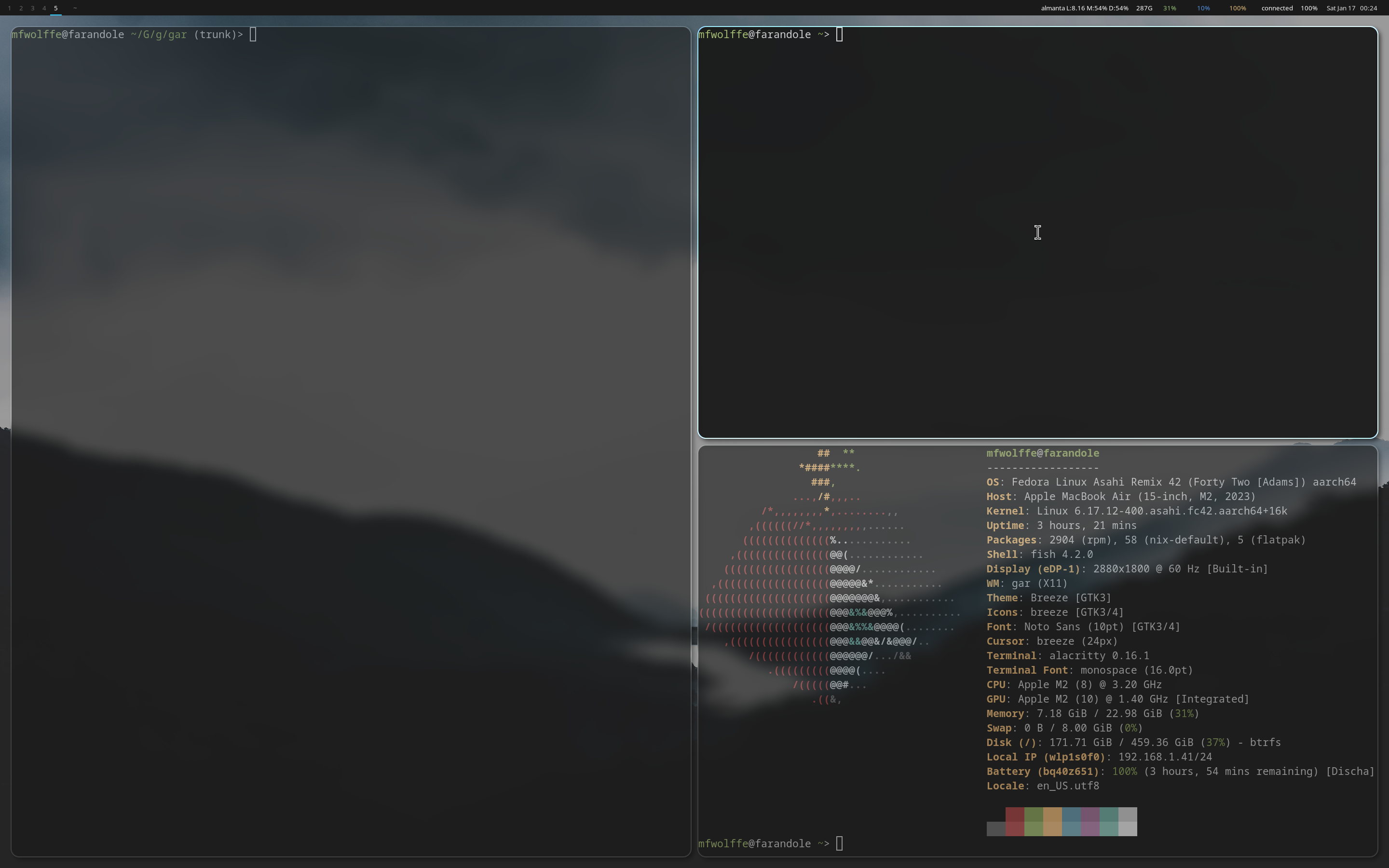
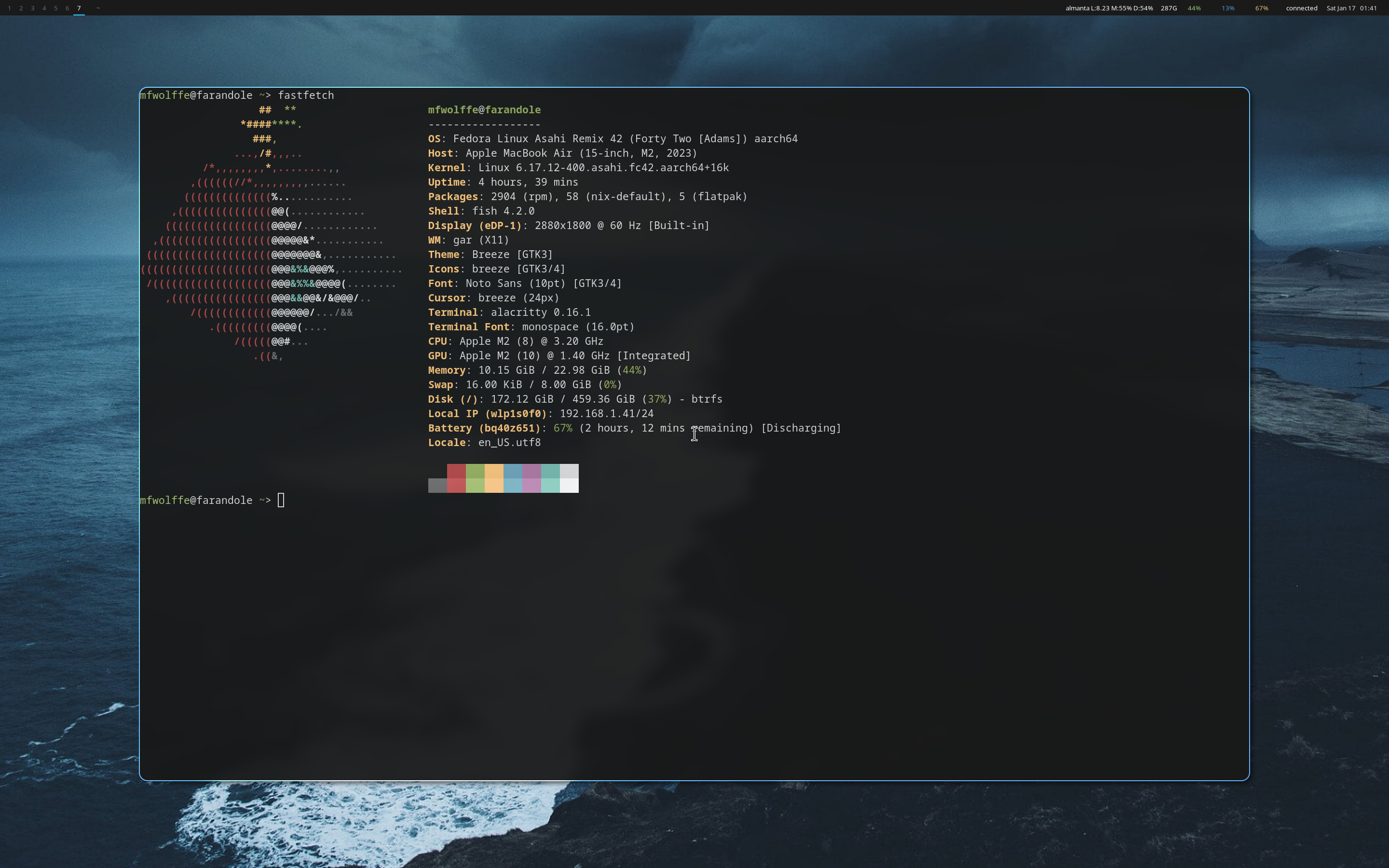
An event-driven X11 tiling window manager with a binary tree layout engine. gar gives you full control over your windows with intuitive keyboard-driven navigation, powerful Lua configuration, and deep integration with the gardesk ecosystem.

Features
- Binary space partition (BSP) tree layout with smart splits
- Full Lua 5.4 scripting for configuration
- Multi-monitor support with per-monitor workspaces
- EWMH compliant for compatibility with bars and tools
- i3-compatible IPC for polybar and other tools
- Unix socket IPC for runtime control via garctl
- Customizable gaps, borders, and gradient colors
- Window rules for automatic placement and floating
- Click-to-focus with keyboard navigation
- Mouse drag for moving/resizing floating windows
- Compositor support: picom, garchomp, or none
- Auto-spawn garnotify and garbar from Lua config
- Session management with systemd integration
Quick Start Guide
Get up and running with gar in just a few steps. This guide covers installation, basic configuration, and essential keybindings.
1. Installation
Install gar using the unified installer or build from source:
2. First Launch
Start gar from your display manager or directly from a TTY:
Or select "gar" from your display manager's session menu.
3. Essential Keybindings
The default configuration uses Super (Windows key) as the modifier:
| Keybinding | Action |
|---|---|
| Mod + Return | Open terminal |
| Mod + q | Close focused window |
| Mod + h/j/k/l | Focus left/down/up/right |
| Mod + Shift + h/j/k/l | Swap window in direction |
| Mod + Ctrl + h/j/k/l | Resize split in direction |
| Mod + 1-9, 0 | Switch to workspace 1-10 |
| Mod + Shift + 1-9, 0 | Move window to workspace |
| Mod + f | Toggle floating |
| Mod + Shift + f | Toggle fullscreen |
| Mod + e | Equalize all splits |
| Mod + Shift + r | Reload configuration |
| Mod + Shift + Escape | Exit gar |
4. Configuration File
Edit your config at ~/.config/gar/init.lua. Changes apply after reload (Mod + Shift + r).
5. Control with garctl
Use garctl to control gar from scripts or the command line:
Configuration Reference
gar uses Lua for configuration, providing full scripting capabilities. The config file is located at ~/.config/gar/init.lua.
Minimal Configuration
-- Minimal gar configuration
local mod = "mod"  -- Super/Windows key

-- Appearance
gar.set("border_width", 2)
gar.set("border_color_focused", "#5294e2")
gar.set("border_color_unfocused", "#2d2d2d")
gar.set("gap_inner", 8)
gar.set("gap_outer", 8)

-- Essential keybindings
gar.bind(mod .. "+Return", function() gar.exec("alacritty") end)
gar.bind(mod .. "+q", gar.close_window)
gar.bind(mod .. "+shift+r", gar.reload)
gar.bind(mod .. "+shift+Escape", gar.exit)

-- Navigation (vim-style)
gar.bind(mod .. "+h", gar.focus("left"))
gar.bind(mod .. "+j", gar.focus("down"))
gar.bind(mod .. "+k", gar.focus("up"))
gar.bind(mod .. "+l", gar.focus("right"))

-- Workspaces 1-9
for i = 1, 9 do
    gar.bind(mod .. "+" .. i, gar.workspace(i))
    gar.bind(mod .. "+shift+" .. i, gar.move_to_workspace(i))
end
Full Configuration Example
-- ═══════════════════════════════════════════
-- gar configuration
-- ═══════════════════════════════════════════
local mod = "mod"  -- Use "alt" for testing in Xephyr

-- ═══════════════════════════════════════════
-- Window Borders
-- ═══════════════════════════════════════════

gar.set("border_width", 2)
gar.set("border_color_focused", "#5294e2")
gar.set("border_color_unfocused", "#2d2d2d")
gar.set("border_color_urgent", "#ff5555")

-- Gradient borders (optional)
gar.set("border_gradient_enabled", false)
gar.set("border_gradient_start_focused", "#5294e2")
gar.set("border_gradient_end_focused", "#1a5fb4")
gar.set("border_gradient_direction", "vertical")

-- ═══════════════════════════════════════════
-- Gaps
-- ═══════════════════════════════════════════

gar.set("gap_inner", 8)   -- Between windows
gar.set("gap_outer", 8)   -- At screen edges

-- ═══════════════════════════════════════════
-- Title Bars (optional)
-- ═══════════════════════════════════════════

gar.set("titlebar_enabled", false)
gar.set("titlebar_height", 20)
gar.set("titlebar_color_focused", "#3d3d3d")
gar.set("titlebar_color_unfocused", "#2d2d2d")
gar.set("titlebar_text_color", "#ffffff")

-- ═══════════════════════════════════════════
-- Behavior
-- ═══════════════════════════════════════════

gar.set("follow_window_on_move", true)
gar.set("mouse_follows_focus", false)

-- ═══════════════════════════════════════════
-- Picom Compositor
-- ═══════════════════════════════════════════

gar.set("corner_radius", 12)
gar.set("blur_enabled", true)
gar.set("blur_method", "dual_kawase")
gar.set("blur_strength", 5)
gar.set("shadow_enabled", true)
gar.set("shadow_radius", 12)
gar.set("shadow_opacity", 0.75)
gar.set("opacity_focused", 1.0)
gar.set("opacity_unfocused", 0.95)

-- Animations (picom v12+)
gar.set("animation_open", "fly-in")
gar.set("animation_close", "fly-out")
gar.set("animation_duration", 0.2)

-- ═══════════════════════════════════════════
-- Keybindings - Launchers
-- ═══════════════════════════════════════════

gar.bind(mod .. "+Return", function()
    gar.exec("alacritty || kitty || foot || xterm")
end)
gar.bind(mod .. "+space", function()
    gar.exec("garlaunch")
end)

-- ═══════════════════════════════════════════
-- Keybindings - Window Management
-- ═══════════════════════════════════════════

gar.bind(mod .. "+q", gar.close_window)
gar.bind(mod .. "+shift+q", gar.force_close_window)
gar.bind(mod .. "+f", gar.toggle_floating)
gar.bind(mod .. "+shift+f", gar.toggle_fullscreen)
gar.bind(mod .. "+e", gar.equalize)
gar.bind(mod .. "+grave", gar.cycle_floating)

-- Navigation
gar.bind(mod .. "+h", gar.focus("left"))
gar.bind(mod .. "+j", gar.focus("down"))
gar.bind(mod .. "+k", gar.focus("up"))
gar.bind(mod .. "+l", gar.focus("right"))

-- Swap windows
gar.bind(mod .. "+shift+h", gar.swap("left"))
gar.bind(mod .. "+shift+j", gar.swap("down"))
gar.bind(mod .. "+shift+k", gar.swap("up"))
gar.bind(mod .. "+shift+l", gar.swap("right"))

-- Resize splits
gar.bind(mod .. "+ctrl+h", gar.resize("left", 0.05))
gar.bind(mod .. "+ctrl+j", gar.resize("down", 0.05))
gar.bind(mod .. "+ctrl+k", gar.resize("up", 0.05))
gar.bind(mod .. "+ctrl+l", gar.resize("right", 0.05))

-- ═══════════════════════════════════════════
-- Keybindings - Workspaces
-- ═══════════════════════════════════════════

for i = 1, 9 do
    gar.bind(mod .. "+" .. i, gar.workspace(i))
    gar.bind(mod .. "+shift+" .. i, gar.move_to_workspace(i))
end
gar.bind(mod .. "+0", gar.workspace(10))
gar.bind(mod .. "+shift+0", gar.move_to_workspace(10))

gar.bind(mod .. "+bracketleft", gar.workspace_prev())
gar.bind(mod .. "+bracketright", gar.workspace_next())

-- ═══════════════════════════════════════════
-- Keybindings - Multi-Monitor
-- ═══════════════════════════════════════════

gar.bind(mod .. "+comma", gar.focus_monitor("prev"))
gar.bind(mod .. "+period", gar.focus_monitor("next"))
gar.bind(mod .. "+shift+comma", gar.move_to_monitor("prev"))
gar.bind(mod .. "+shift+period", gar.move_to_monitor("next"))

-- ═══════════════════════════════════════════
-- Keybindings - Session
-- ═══════════════════════════════════════════

gar.bind(mod .. "+shift+r", gar.reload)
gar.bind(mod .. "+shift+Escape", gar.exit)
gar.bind(mod .. "+Escape", function() gar.exec("garlock") end)

-- ═══════════════════════════════════════════
-- Window Rules
-- ═══════════════════════════════════════════

-- Float dialogs and utilities
gar.rule({ class = "Pavucontrol" }, { floating = true })
gar.rule({ class = "Nm-connection-editor" }, { floating = true })
gar.rule({ title = "File Upload" }, { floating = true })
gar.rule({ instance = "dialog" }, { floating = true })

-- Assign apps to workspaces
gar.rule({ class = "Firefox" }, { workspace = 2 })
gar.rule({ class = "Slack" }, { workspace = 4 })
gar.rule({ class = "Spotify" }, { workspace = 9 })

-- ═══════════════════════════════════════════
-- Per-Window Picom Rules
-- ═══════════════════════════════════════════

gar.picom_rule({
    match = "class_g = 'Firefox'",
    corner_radius = 0,
    opacity = 1.0
})

-- ═══════════════════════════════════════════
-- Startup Applications
-- ═══════════════════════════════════════════

gar.exec_once("nm-applet")
gar.exec_once("blueman-applet")
gar.exec_once("garbg daemon")
gar.exec_once("garbg set ~/Pictures/wallpaper.png")
All Configuration Options
| Option | Type | Default | Description |
|---|---|---|---|
| border_width | int | 2 | Border width in pixels |
| border_color_focused | hex | #5294e2 | Focused window border |
| border_color_unfocused | hex | #2d2d2d | Unfocused window border |
| border_color_urgent | hex | #ff5555 | Urgent window border |
| gap_inner | int | 0 | Gap between windows |
| gap_outer | int | 0 | Gap at screen edges |
| follow_window_on_move | bool | false | Follow window to new workspace |
| mouse_follows_focus | bool | false | Warp mouse to focused window |
| focus_follows_mouse | bool | true | Focus window when mouse enters |
| compositor | string | picom | Compositor: picom, garchomp, none |
| corner_radius | int | 12 | Window corner radius (picom) |
| blur_enabled | bool | true | Enable blur effect |
| blur_method | string | dual_kawase | gaussian, dual_kawase, box |
| blur_strength | int | 5 | Blur intensity (1-20) |
| shadow_enabled | bool | true | Enable window shadows |
| shadow_radius | int | 12 | Shadow blur radius |
| shadow_opacity | float | 0.75 | Shadow opacity (0.0-1.0) |
| shadow_offset_x | int | -7 | Shadow horizontal offset |
| shadow_offset_y | int | -7 | Shadow vertical offset |
| opacity_focused | float | 1.0 | Focused window opacity |
| opacity_unfocused | float | 1.0 | Unfocused window opacity |
| fade_enabled | bool | false | Enable window fade transitions |
| fade_delta | int | 10 | Fade step size |
| animation_open | string | none | fly-in, slide-in, appear, none |
| animation_close | string | none | fly-out, slide-out, disappear, none |
| border_color_swap_target | hex | #00ff00 | Swap target highlight color |
| monitor_order | table | {} | Monitor arrangement order |
| screen_timeout_enabled | bool | true | Enable DPMS screen timeout |
| screen_timeout | int | 600 | Screen timeout in seconds |
| picom_shader | string | "" | Custom picom GLSL shader path |
Overview
gar is an event-driven X11 tiling window manager written in Rust. It uses a binary space partition (BSP) tree layout engine to automatically arrange windows, while providing full control through Lua scripting.
Architecture
- Layout Engine: BSP tree with smart splitting (wider containers split vertically, taller split horizontally)
- Configuration: Embedded Lua 5.4 via mlua
- X11 Backend: x11rb for zero-copy event handling
- IPC: JSON over Unix domain sockets + i3-compatible protocol
- EWMH: Full compliance for status bar integration
File Locations
| ~/.config/gar/init.lua | Configuration file |
| ~/.config/gar/picom.conf | Auto-generated picom config |
| /tmp/gar.log | Log file |
| $XDG_RUNTIME_DIR/gar.sock | IPC socket |
| $XDG_RUNTIME_DIR/gar-i3.sock | i3-compatible IPC socket |
Lua API
gar exposes a comprehensive Lua API for configuration. All functions are available in the global gar table.
Lua Functions
gar.set(key, value)
Sets a configuration option. See the Config tab for all available keys.
gar.set("border_width", 2)
gar.set("gap_inner", 8)
gar.bind(keyspec, action)
Registers a keybinding. Action can be a function or built-in action.
gar.bind("mod+Return", function() gar.exec("alacritty") end)
gar.bind("mod+q", gar.close_window)
gar.bind("mod+h", gar.focus("left"))
gar.exec(command)
Executes a shell command. Runs every time the binding is triggered.
gar.exec("alacritty")
gar.exec("notify-send 'Hello!'")
gar.exec_once(command)
Executes a shell command only once per session. Useful for autostart.
gar.exec_once("nm-applet")
gar.exec_once("garbg daemon")
gar.spawn(type)
Planned, not yet implemented. Will spawn a named application configured via gar.set("spawns", ...). Use gar.exec() instead.
-- Currently use gar.exec() for launching applications:
gar.exec("garterm")
gar.rule(match, actions)
Registers a window rule for automatic configuration.
gar.rule({ class = "Firefox" }, { workspace = 2 })
gar.rule({ title = "Dialog" }, { floating = true })
gar.picom_rule(config)
Registers per-window picom compositor rules.
gar.picom_rule({
    match = "class_g = 'Firefox'",
    corner_radius = 0,
    opacity = 1.0
})
Built-in Actions
Simple Actions
These can be passed directly to gar.bind():
| gar.close_window | Close focused window gracefully |
| gar.force_close_window | Force kill window |
| gar.toggle_floating | Toggle floating state |
| gar.toggle_fullscreen | Toggle fullscreen |
| gar.equalize | Reset all splits to 50/50 |
| gar.cycle_floating | Cycle through floating windows |
| gar.reload | Reload configuration |
| gar.exit | Exit gar |
Parameterized Actions
These return an action when called:
| gar.focus(dir) | Focus window in direction (left/right/up/down) |
| gar.swap(dir) | Swap with window in direction |
| gar.resize(dir, amt) | Resize split (amt default: 0.05 = 5%) |
| gar.workspace(n) | Switch to workspace n (1-10) |
| gar.workspace_next() | Switch to next workspace (wraps) |
| gar.workspace_prev() | Switch to previous workspace (wraps) |
| gar.move_to_workspace(n) | Move window to workspace |
| gar.focus_monitor(target) | Focus monitor (next/prev/name) |
| gar.move_to_monitor(target) | Move window to monitor |
Keybindings
Use gar.bind(keyspec, action) to register keybindings. The keyspec format is "modifier+key".
-- Simple keybinding with action
gar.bind("mod+q", gar.close_window)

-- Keybinding with Lua callback
gar.bind("mod+Return", function()
    gar.exec("alacritty")
end)

-- Parameterized action
gar.bind("mod+h", gar.focus("left"))

-- Multiple modifiers
gar.bind("mod+shift+q", gar.force_close_window)
gar.bind("mod+ctrl+h", gar.resize("left", 0.05))
Modifier Keys
| Modifier | Aliases | Key |
|---|---|---|
| mod | super, mod4 | Super/Windows key |
| alt | mod1 | Alt key |
| shift | - | Shift key |
| ctrl | control | Control key |
Modifiers are combined with + in lowercase: "mod+shift+q"
Key Names
Special Keys
Punctuation
Media Keys (XF86)
Letters: a through z (lowercase). Numbers: 0 through 9.
Appearance
Configure the visual appearance of windows using gar.set().
Borders
-- Border settings
gar.set("border_width", 2)                    -- Pixels
gar.set("border_color_focused", "#5294e2")    -- Focused window
gar.set("border_color_unfocused", "#2d2d2d")  -- Unfocused windows
gar.set("border_color_urgent", "#ff5555")     -- Urgent windows

-- Gradient borders (optional)
gar.set("border_gradient_enabled", true)
gar.set("border_gradient_start_focused", "#5294e2")
gar.set("border_gradient_end_focused", "#1a5fb4")
gar.set("border_gradient_start_unfocused", "#3d3d3d")
gar.set("border_gradient_end_unfocused", "#1d1d1d")
gar.set("border_gradient_direction", "vertical")  -- or "horizontal", "diagonal"
Gaps
-- Gap settings
gar.set("gap_inner", 8)   -- Between windows (pixels)
gar.set("gap_outer", 8)   -- At screen edges (pixels)

-- Set to 0 for a compact look
gar.set("gap_inner", 0)
gar.set("gap_outer", 0)
Title Bars
Title bars are optional frame windows drawn by gar. They enable gradient borders and window titles.
-- Enable title bars
gar.set("titlebar_enabled", true)
gar.set("titlebar_height", 20)
gar.set("titlebar_color_focused", "#3d3d3d")
gar.set("titlebar_color_unfocused", "#2d2d2d")
gar.set("titlebar_text_color", "#ffffff")
Tree Layout (BSP)
gar uses a Binary Space Partition (BSP) tree for tiling windows. Each node is either a Leaf (window) or Internal (containing two children).
Smart Split Direction
- Container width > height → split Vertically (side-by-side)
- Container height >= width → split Horizontally (stacked)
Split Behavior
- New splits start at 50/50 ratio
- Resize with
gar.resize(dir, amt) - Ratio clamped to 10%-90% to prevent collapse
gar.equalizeresets all splits to 50/50
Focus Navigation
gar.focus(direction) finds the geometrically adjacent window in that direction, not based on tree structure. This allows intuitive navigation.
Window Rules
Automatically configure windows based on their class, instance, or title.
-- Syntax: gar.rule(match_criteria, actions)

-- Float specific windows
gar.rule({ class = "Pavucontrol" }, { floating = true })
gar.rule({ title = "File Upload" }, { floating = true })
gar.rule({ instance = "dialog" }, { floating = true })

-- Assign to workspaces
gar.rule({ class = "Firefox" }, { workspace = 2 })
gar.rule({ class = "Spotify" }, { workspace = 9, floating = true })
Match Criteria
class- WM_CLASS class component (e.g., "Firefox")instance- WM_CLASS instance componenttitle- Window title (_NET_WM_NAME)
Matching is case-insensitive and substring-based. For example, class = "firefox" matches "Firefox" and "firefox-esr". All specified criteria must match (AND logic).
Actions
floating = true/false- Start floating or tiledworkspace = n- Open on workspace n (1-10)
Floating Windows
Floating windows are not part of the tiling layout and can be freely moved and resized.
Toggling Float
gar.toggle_floating- Toggle between tiled/floating- Window rules with
floating = true - Dialog/utility windows auto-detected as floating
Mouse Interaction
Mod + Left Click- Drag to moveMod + Right Click- Drag to resize- Click near edges to resize without modifier
Stacking Order
Clicking or focusing a floating window raises it to the top. Use gar.cycle_floating to cycle through floating windows.
Workspaces
gar provides 10 workspaces (numbered 1-10). Each workspace maintains its own tiling tree and floating window list.
-- Switch to workspace
gar.bind("mod+1", gar.workspace(1))
gar.bind("mod+2", gar.workspace(2))

-- Move window to workspace
gar.bind("mod+shift+1", gar.move_to_workspace(1))

-- Workspace navigation
gar.bind("mod+bracketleft", gar.workspace_prev())
gar.bind("mod+bracketright", gar.workspace_next())

-- Loop for workspaces 1-10
for i = 1, 9 do
    gar.bind("mod+" .. i, gar.workspace(i))
    gar.bind("mod+shift+" .. i, gar.move_to_workspace(i))
end
gar.bind("mod+0", gar.workspace(10))
gar.bind("mod+shift+0", gar.move_to_workspace(10))
Follow Window on Move
Set gar.set("follow_window_on_move", true) to automatically switch to the workspace when moving a window.
Multi-Monitor
gar supports multiple monitors with i3-style workspace assignment. Each workspace can be assigned to any monitor.
-- Focus monitor
gar.bind("mod+comma", gar.focus_monitor("prev"))
gar.bind("mod+period", gar.focus_monitor("next"))
gar.bind("mod+m", gar.focus_monitor("HDMI-1"))  -- By name

-- Move window to monitor
gar.bind("mod+shift+comma", gar.move_to_monitor("prev"))
gar.bind("mod+shift+period", gar.move_to_monitor("next"))
Monitor Detection
gar uses RandR to detect monitors. Use xrandr to see monitor names.
Compositor Integration
gar supports multiple compositors. Select which compositor to use with the compositor setting.
Compositor Selection
-- Select compositor: "picom" (default), "garchomp", or "none"
gar.set("compositor", "picom")      -- Use picom (auto-generates config)
gar.set("compositor", "garchomp")   -- Use garchomp (GPU-accelerated)
gar.set("compositor", "none")       -- Disable compositor
When using picom, gar auto-generates a configuration at ~/.config/gar/picom.conf based on your Lua settings. When using garchomp, effects are configured in ~/.config/garchomp/config.lua.
Picom Settings
-- Picom compositor settings (only used when compositor = "picom")
gar.set("corner_radius", 12)
gar.set("blur_enabled", true)
gar.set("blur_method", "dual_kawase")  -- or "gaussian", "box"
gar.set("blur_strength", 5)            -- 1-20 for dual_kawase

-- Shadows
gar.set("shadow_enabled", true)
gar.set("shadow_radius", 12)
gar.set("shadow_opacity", 0.75)
gar.set("shadow_offset_x", -7)
gar.set("shadow_offset_y", -7)

-- Opacity
gar.set("opacity_focused", 1.0)
gar.set("opacity_unfocused", 0.95)

-- Fading
gar.set("fade_enabled", true)
gar.set("fade_delta", 10)

-- Animations (picom v12+)
gar.set("animation_open", "fly-in")    -- "slide-in", "appear", "none"
gar.set("animation_close", "fly-out")  -- "slide-out", "disappear", "none"
gar.set("animation_duration", 0.2)

-- Custom shader
gar.set("picom_shader", "~/.config/gar/shaders/custom.glsl")
Per-Window Rules
gar.picom_rule({
    match = "class_g = 'Firefox'",
    corner_radius = 0,
    opacity = 1.0,
    shadow = false,
    blur_background = true,
    shader = "~/.config/gar/shaders/focused-glow.glsl"
})
Bar Integration
gar can automatically spawn garbar and communicates via EWMH properties.
Automatic garbar
If gar.bar table exists in your config, garbar is spawned automatically:
-- Enable garbar auto-spawn
gar.bar = {}

-- Or manually start garbar
gar.exec_once("garbar")
EWMH Properties
gar sets these properties for status bars:
_NET_CURRENT_DESKTOP- Active workspace_NET_ACTIVE_WINDOW- Focused window_NET_NUMBER_OF_DESKTOPS- Workspace count
i3-Compatible IPC
The I3SOCK environment variable points to an i3-compatible socket for polybar and other tools.
Terminal Integration
gar integrates with garterm for shared Lua configuration and easy spawning.
Configure garterm via Lua
When garterm starts, it reads the gar.terminal table from your gar config:
-- Configure garterm from gar's init.lua
gar.terminal = {
    shell = "/bin/zsh",
    font = {
        family = "JetBrains Mono",
        size = 14.0,
    },
    colors = {
        preset = "tokyo_night",  -- or catppuccin, gruvbox, dracula, nord, etc.
    },
    tab_bar = {
        position = "top",
        show_single_tab = false,
    },
}
Spawn garterm
-- Keybind to spawn terminal
gar.bind("Mod + Return", function()
    gar.exec("garterm")
end)

-- Keybind to spawn file manager
gar.bind("Mod + e", function()
    gar.exec("garfield")
end)
Named Sessions
Define reusable terminal layouts:
gar.terminal.sessions = {
    webdev = {
        tabs = {
            { title = "Frontend", cwd = "~/app", cmd = "npm run dev" },
            { title = "Backend", cmd = "cargo watch -x run" },
            { title = "Shell" },
        }
    },
}

-- Load session via keybind or gartermctl
gar.bind("Mod + Shift + w", function()
    os.execute("gartermctl load-session webdev")
end)
See the garterm documentation for full configuration options.
Notification Integration
gar integrates with garnotify for desktop notifications with automatic spawning and shared Lua configuration.
Automatic garnotify
If gar.notification table exists in your config, garnotify is spawned automatically:
-- Enable garnotify with defaults
gar.notification = {}

-- Or customize
gar.notification = {
    position = "top-right",
    width = 350,
    offset_x = 20,
    offset_y = 40,

    timeouts = {
        low = 10000,
        normal = 5000,
        critical = 0,  -- never expire
    },

    colors = {
        background = "#1e1e2e",
        foreground = "#cdd6f4",
        border = "#45475a",
        critical_background = "#f38ba8",
    },

    animation = {
        enabled = true,
        fade_in = 150,
        fade_out = 150,
        slide = "down",
    },
}
Lifecycle Management
gar handles the notification daemon lifecycle:
- Spawns garnotify at startup when
gar.notificationis configured - Waits for socket to be ready before proceeding
- Stops garnotify cleanly when gar exits
Keybind Control
-- Close all notifications
gar.bind("Mod + Escape", function()
    os.execute("garnotifyctl close-all")
end)

-- Toggle Do Not Disturb
gar.bind("Mod + Shift + n", function()
    os.execute("garnotifyctl set-paused toggle")
end)

-- Pop from history
gar.bind("Mod + n", function()
    os.execute("garnotifyctl history-pop")
end)
See the garnotify documentation for full configuration options, rules, and IPC commands.
Session Management
The gar-session.sh script handles session setup.
What it does
- Imports DISPLAY/XAUTHORITY to systemd user session
- Starts picom compositor before gar
- Starts
gar-session.targetfor user services
Environment Variables
| GAR_LOG | Log level (debug, info, warn, error) |
| RUST_LOG | Alternative log level |
| I3SOCK | i3-compatible IPC socket path |
Mouse Bindings
gar has built-in mouse bindings for window interaction. These are not configurable via Lua.
Click-to-Focus
Clicking any window focuses it. This works for both tiled and floating windows.
Floating Window Manipulation
| Action | Binding |
|---|---|
| Move window | Mod + Left Click + Drag |
| Resize window | Mod + Right Click + Drag |
| Edge resize | Click near edge + Drag |
Edge Detection
Hovering near a floating window's edge (20px margin) changes the cursor. You can resize by clicking and dragging without the modifier key. 8 resize directions are supported (corners + sides).
Common Workflows
Practical examples of using gar with other gardesk components for common desktop tasks.
Desktop Session Startup
Configure your init.lua to launch components on startup:
-- ~/.config/gar/init.lua

-- Start garbar automatically (gar spawns it if configured)
gar.bar = {}

-- Startup applications (run once per session)
gar.exec_once("garbg daemon")         -- Wallpaper daemon
gar.exec_once("nm-applet")            -- Network applet
gar.exec_once("blueman-applet")       -- Bluetooth
gar.exec_once("dunst")                -- Notifications

-- Set initial wallpaper
gar.exec_once("garbg set ~/Pictures/wallpaper.png")
Quick Application Launcher
Use garlaunch for fast application launching with fuzzy search:
-- Bind garlaunch modes
gar.bind("mod+space", function() gar.exec("garlaunch") end)
gar.bind("mod+r", function() gar.exec("garlaunch --mode run") end)
gar.bind("mod+w", function() gar.exec("garlaunch --mode window") end)
Lock Screen
Bind garlock for screen locking:
-- Manual lock
gar.bind("mod+Escape", function() gar.exec("garlock") end)

-- Auto-lock with xidlehook (run in exec_once)
gar.exec_once('xidlehook --timer 300 "garlock" ""')
Screenshot Workflow
-- Full screen screenshot
gar.bind("Print", function()
    gar.exec("scrot ~/Pictures/screenshot-%Y%m%d-%H%M%S.png")
end)

-- Selection screenshot
gar.bind("shift+Print", function()
    gar.exec("scrot -s ~/Pictures/screenshot-%Y%m%d-%H%M%S.png")
end)

-- Active window screenshot
gar.bind("mod+Print", function()
    gar.exec("scrot -u ~/Pictures/screenshot-%Y%m%d-%H%M%S.png")
end)
Media Controls
-- Volume
gar.bind("XF86AudioRaiseVolume", function()
    gar.exec("pactl set-sink-volume @DEFAULT_SINK@ +5%")
end)
gar.bind("XF86AudioLowerVolume", function()
    gar.exec("pactl set-sink-volume @DEFAULT_SINK@ -5%")
end)
gar.bind("XF86AudioMute", function()
    gar.exec("pactl set-sink-mute @DEFAULT_SINK@ toggle")
end)

-- Brightness
gar.bind("XF86MonBrightnessUp", function()
    gar.exec("brightnessctl set +10%")
end)
gar.bind("XF86MonBrightnessDown", function()
    gar.exec("brightnessctl set 10%-")
end)
Scratchpad Terminal
Create a toggleable floating terminal:
-- Float terminal by class
gar.rule({ class = "scratchpad" }, { floating = true })

-- Toggle scratchpad (launch or focus)
gar.bind("mod+grave", function()
    gar.exec("alacritty --class scratchpad")
end)
IPC Protocol
gar exposes two IPC sockets: a native JSON socket and an i3-compatible binary socket.
Socket Locations
garctl Commands
| Command | Arguments | Description |
|---|---|---|
| focus | left|right|up|down | Focus window in direction |
| swap | left|right|up|down | Swap windows |
| resize | direction [amount] | Resize split |
| workspace | 1-10 | Switch workspace |
| move_to_workspace | 1-10 | Move window |
| close | - | Close focused window |
| toggle_floating | - | Toggle floating state |
| equalize | - | Equalize splits |
| reload | - | Reload config |
| exit | - | Exit gar |
| focus_monitor | left|right|name | Focus a monitor by direction or output name |
| move_to_monitor | left|right|name | Move window to monitor by direction or output name |
| subscribe | - | Subscribe to workspace/window events |
| get_workspaces | - | Query workspaces |
| get_focused | - | Query focused window |
| get_tree | - | Query window tree |
| get_monitors | - | Query monitors |
JSON Protocol
{"command": "focus", "args": {"direction": "left"}}
{"command": "workspace", "args": {"number": 3}}
{"command": "resize", "args": {"direction": "right", "amount": 0.05}}
{"command": "get_workspaces"}// Success
{"success": true, "data": null}
// Success with data
{"success": true, "data": [
{"id": 1, "name": "1", "focused": true, "tiled_count": 2}
]}
// Error
{"success": false, "error": "No focused window"}i3-Compatible IPC
The i3 socket supports polybar and other i3 ecosystem tools:
| Type | Description |
|---|---|
| GET_WORKSPACES | Returns workspace array |
| GET_OUTPUTS | Returns monitor info |
| SUBSCRIBE | Subscribe to events |
| GET_VERSION | Returns WM version |
Troubleshooting
gar won't start
Check the log file for errors:
Keybindings not working
Verify your config loads without errors:
Windows not tiling correctly
Some apps set incorrect window types:
Add a window rule to force tiling or floating.
garctl: connection refused
The IPC socket may not exist:
Picom effects not working
Check picom is running with the right config:
Testing in Xephyr
Test safely without replacing your current WM:
Use alt as modifier in Xephyr to avoid conflicts.
Multi-monitor issues
Verify monitor configuration:
Configure monitors with xrandr or arandr before starting gar.
garbar not appearing
Check if gar.bar is configured:
Add gar.bar = {} to your config or run gar.exec_once("garbar").