garnotify
Desktop Notification Daemon
A notification daemon implementing the FreeDesktop Desktop Notifications Specification. Features smooth fade/slide animations, urgency-based styling, action buttons, notification history, and a powerful rule engine for filtering and modifying notifications. Integrates with gar via shared Lua configuration and automatic spawning.
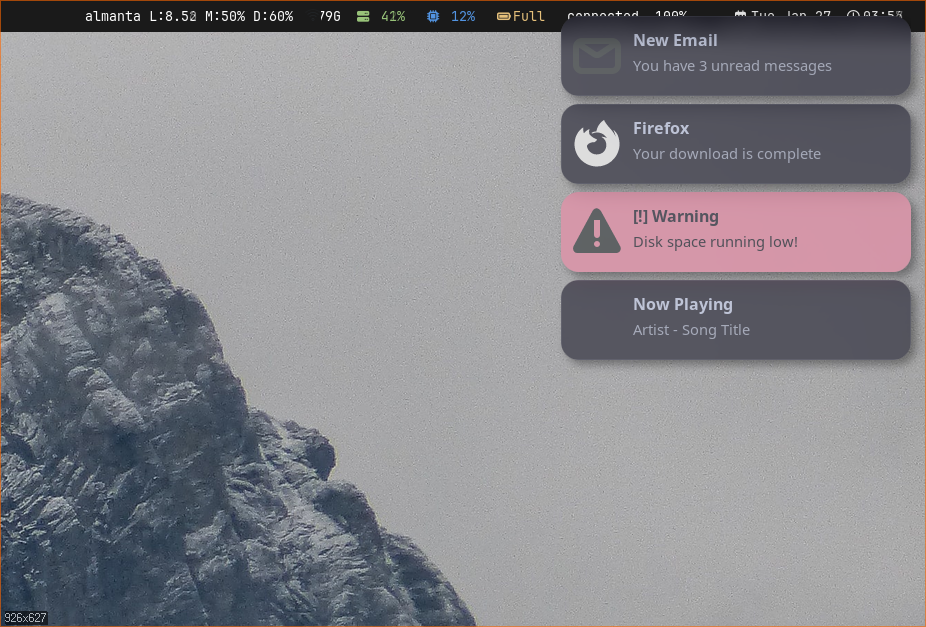
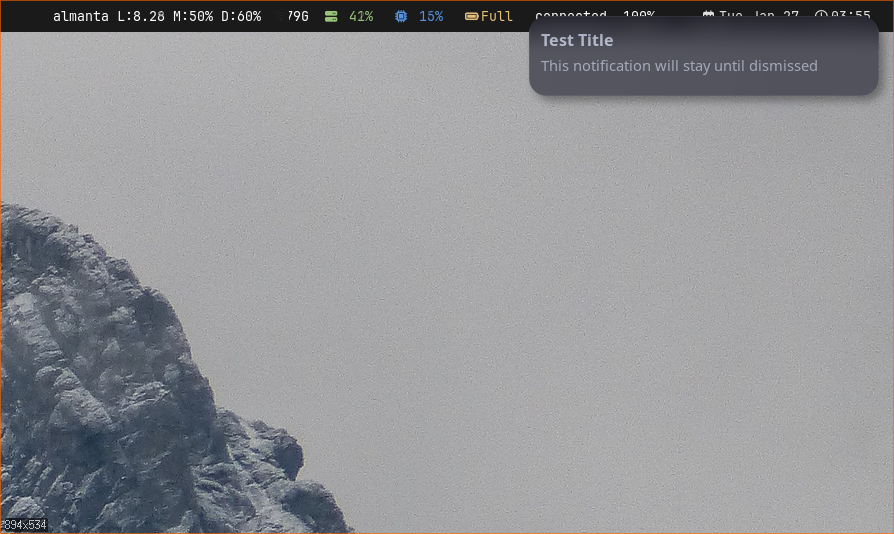
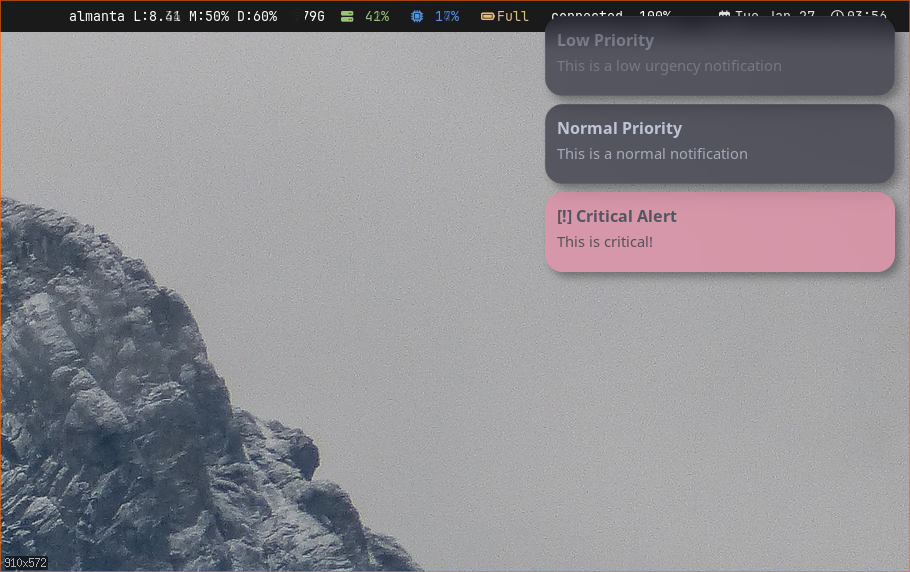
Features
- FreeDesktop Notifications Spec 1.2 compliant
- D-Bus integration (org.freedesktop.Notifications)
- Smooth fade and slide animations
- Urgency-based styling (low, normal, critical)
- Action buttons with hover effects
- Notification history with persistence
- Rule engine for filtering and modification
- Do Not Disturb mode with pause levels
- Pango markup support in body text
- Icon loading (PNG, JPEG, SVG, theme icons)
- Multi-monitor support (primary, mouse, named)
- IPC control via garnotifyctl
- Lua + TOML configuration
- gar integration with auto-spawn
- Replacement notifications (progress bars)
- 6 position options (corners + center)
Installation
garnotify is included in the desktop install preset. Build from source:
cd garnotify
cargo build --release

# Binaries produced:
# target/release/garnotify      - Notification daemon
# target/release/garnotifyctl   - Control client
Quick Start
With gar, simply add a gar.notification table to your config.
garnotify will be spawned automatically:
-- Enable garnotify with default settings
gar.notification = {}

-- Or customize
gar.notification = {
    position = "top-right",
    width = 350,
    timeout = 5000,

    colors = {
        background = "#1e1e2e",
        foreground = "#cdd6f4",
    },

    animation = {
        enabled = true,
        fade_in = 150,
        slide = "down",
    },
}
Or run standalone:
# Start the daemon
garnotify

# Test with notify-send
notify-send "Hello" "This is a test notification"

# Control via garnotifyctl
garnotifyctl close-all
garnotifyctl set-paused true
Configuration Priority
garnotify loads configuration in this order (first found wins):
--configCLI flag~/.config/gar/init.lua(gar ecosystem)~/.config/garnotify/config.toml- Built-in defaults
TOML Configuration
Full configuration reference for ~/.config/garnotify/config.toml:
[general]
monitor = "primary"          # "primary", "mouse", or monitor name
follow_mouse = false         # Track monitor at pointer

[geometry]
position = "top-right"       # top-left, top-right, bottom-left, bottom-right,
                             # top-center, bottom-center
width = 350                  # Notification width in pixels
max_height = 150             # Per-notification max height (0 = unlimited)
offset_x = 20                # Horizontal margin from edge
offset_y = 40                # Vertical margin from edge
gap = 10                     # Gap between stacked notifications
max_visible = 5              # Maximum visible at once (0 = unlimited)

[timeouts]
low = 10000                  # Low urgency timeout (ms)
normal = 5000                # Normal urgency timeout (ms)
critical = 0                 # Critical timeout (0 = never expire)

[appearance]
font = "Sans 11"             # Pango font description (body text)
title_font = "Sans Bold 12"  # Pango font description (summary)
icon_size = 48               # Icon size in pixels
padding = 12                 # Internal padding
corner_radius = 8            # Corner radius in pixels
border_width = 2             # Border width
markup_enabled = true        # Enable Pango markup parsing

[appearance.colors]
background = "#1e1e2e"       # Normal background
foreground = "#cdd6f4"       # Normal foreground
border = "#45475a"           # Normal border
low_background = "#1e1e2e"   # Low urgency background
low_foreground = "#6c7086"   # Low urgency text (dimmer)
low_border = "#45475a"       # Low urgency border
critical_background = "#f38ba8"  # Critical background (red)
critical_foreground = "#1e1e2e"  # Critical text (inverted)
critical_border = "#f38ba8"      # Critical border

[animation]
enabled = true               # Enable animations
fade_in = 150                # Fade-in duration (ms)
fade_out = 150               # Fade-out duration (ms)
slide = "down"               # Slide direction: up, down, left, right, none
slide_distance = 20          # Slide distance in pixels

[history]
max_length = 100             # Max notifications in history
persist = true               # Save/load from disk
Lua Configuration (gar integration)
When using gar, configure via gar.notification table:
gar.notification = {
    -- Geometry
    position = "top-right",
    width = 350,
    max_height = 150,
    offset_x = 20,
    offset_y = 40,
    gap = 10,
    max_visible = 5,

    -- Monitor
    monitor = "primary",
    follow_mouse = false,

    -- Timeouts (flat or nested)
    timeout = 5000,  -- applies to normal
    timeouts = {
        low = 10000,
        normal = 5000,
        critical = 0,
    },

    -- Appearance
    font = "Sans 11",
    title_font = "Sans Bold 12",
    icon_size = 48,
    padding = 12,
    corner_radius = 8,
    border_width = 2,
    markup_enabled = true,

    -- Colors (flat or nested)
    background = "#1e1e2e",
    foreground = "#cdd6f4",
    border = "#45475a",

    colors = {
        background = "#1e1e2e",
        foreground = "#cdd6f4",
        border = "#45475a",
        low_background = "#1e1e2e",
        low_foreground = "#6c7086",
        critical_background = "#f38ba8",
        critical_foreground = "#1e1e2e",
    },

    -- Animation
    animation = {
        enabled = true,
        fade_in = 150,
        fade_out = 150,
        slide = "down",
        slide_distance = 20,
    },

    -- History
    history = {
        max_length = 100,
        persist = true,
    },
}
Color Format
Colors can be specified in multiple formats:
| Format | Example |
|---|---|
| Hex (6 digit) | #1e1e2e |
| Hex (8 digit, with alpha) | #1e1e2ecc |
| RGB | rgb(30, 30, 46) |
| RGBA | rgba(30, 30, 46, 0.8) |
Overview
garnotify is a notification daemon that implements the FreeDesktop Desktop Notifications Specification version 1.2. Applications send notifications via D-Bus, and garnotify renders them as popup windows.
Key Components
- Daemon - Main process managing notification lifecycle
- D-Bus Service - Receives notifications from applications
- UI Thread - Renders popups with Cairo/Pango
- IPC Server - Unix socket for garnotifyctl
- Rule Engine - Filters and modifies notifications
Capabilities
garnotify advertises these capabilities to applications:
actions- Clickable action buttonsbody- Multi-line body textbody-markup- Pango markup in bodybody-hyperlinks- Underlined linksicon-static- Static icon displaypersistence- History support
Architecture
garnotify runs a Tokio async runtime for D-Bus, IPC, and timeout scheduling, with a separate std::thread for the X11 UI rendering. Notifications flow from D-Bus through a rule engine into the UI thread via popup commands.
Workspace Structure
| garnotify | Main daemon binary |
| garnotifyctl | CLI control client |
| garnotify-ipc | Shared IPC protocol definitions |
Daemon Architecture
The daemon runs a tokio async runtime with a separate std::thread for UI rendering.
Components
┌─────────────────────────────────────────────────────────┐
│                    Tokio Runtime                         │
│  ┌─────────────┐  ┌─────────────┐  ┌─────────────┐      │
│  │ D-Bus       │  │ IPC Server  │  │ Timeout     │      │
│  │ Service     │  │ (Unix sock) │  │ Scheduler   │      │
│  └──────┬──────┘  └──────┬──────┘  └──────┬──────┘      │
│         │                │                │              │
│         └────────────────┼────────────────┘              │
│                          ▼                               │
│               ┌─────────────────────┐                    │
│               │   Event Dispatcher  │                    │
│               │   (Rule Engine)     │                    │
│               └──────────┬──────────┘                    │
│                          │ PopupCommand                  │
└──────────────────────────┼───────────────────────────────┘
                           │
                           ▼
┌─────────────────────────────────────────────────────────┐
│                    UI Thread (std)                       │
│  ┌─────────────┐  ┌─────────────┐  ┌─────────────┐      │
│  │ X11 Window  │  │ Cairo       │  │ Animation   │      │
│  │ Manager     │  │ Renderer    │  │ Controller  │      │
│  └─────────────┘  └─────────────┘  └─────────────┘      │
└─────────────────────────────────────────────────────────┘
Notification Store
Active notifications are stored in a HashMap with automatic timeout scheduling. When a timeout fires, the notification is closed and moved to history.
PID File
garnotify writes a PID file to prevent duplicate instances.
Location: /tmp/garnotify.pid
D-Bus Interface
garnotify registers as org.freedesktop.Notifications on the session bus.
Methods
Notify(
    app_name: String,      # Application name
    replaces_id: u32,      # ID to replace (0 = new)
    app_icon: String,      # Icon name or path
    summary: String,       # Title/summary
    body: String,          # Body text (supports markup)
    actions: [String],     # Action pairs [key, label, ...]
    hints: {String: Variant}, # Hints dictionary
    expire_timeout: i32    # Timeout in ms (-1 = default, 0 = never)
) → u32                    # Returns notification ID

CloseNotification(id: u32) → void

GetCapabilities() → [String]

GetServerInformation() → (name, vendor, version, spec_version)
Supported Hints
| Hint | Type | Description |
|---|---|---|
| urgency | byte | 0=low, 1=normal, 2=critical |
| category | string | Notification category |
| desktop-entry | string | Desktop file name |
| image-path | string | Path to image file |
| image-data | bytes | Raw RGBA pixel data |
| transient | boolean | Skip history persistence |
| resident | boolean | Keep after action invoked |
Signals
NotificationClosed(id, reason)- Notification was closedActionInvoked(id, action_key)- Action button clicked
Rendering
Notification popups are rendered using Cairo for graphics and Pango for text layout via gartk. Each notification is drawn as a rounded rectangle with optional icon, summary, body text, and action buttons. The UI thread handles animation (slide-in/slide-out) and stacking of multiple notifications.
- Window type: Override-redirect X11 popup
- Positioning: Configurable anchor (top-right default), stacked vertically
- Theming: Uses gartk Theme for consistent gardesk appearance
Cairo/Pango Rendering
Notifications are rendered using Cairo for graphics and Pango for text layout.
Popup Layout
┌─────────────────────────────────────┐
│ [Icon]  Summary (title_font, bold)  │
│ [Icon]  Body text wraps here and    │
│         continues on multiple       │
│         lines with word wrapping    │
│                                     │
│   [Action 1]    [Action 2]          │
└─────────────────────────────────────┘
Window Properties
- ARGB32 transparent surface
override_redirect=true- Bypasses window manager- Rounded corners via clipping path
- Urgency-dependent border colors
Height Calculation
Height is calculated dynamically: padding*2 + summary + body + actions.
Minimum 80px, maximum capped by max_height config.
Icon Loading
garnotify loads icons from multiple sources in priority order:
image-datahint - Raw RGBA pixels from D-Busimage-pathhint - Direct file pathapp_iconparameter - Theme name or file pathdesktop-entryhint - Look up from .desktop file- App name as fallback theme lookup
Supported Formats
- PNG - Full alpha support
- JPEG - Converted to RGBA
- SVG - Rendered via resvg at target size
Icons are scaled to icon_size (default 48px) maintaining aspect ratio.
Markup Support
Body text supports Pango XML markup when markup_enabled = true.
Supported Tags
| Tag | Effect |
|---|---|
| <b> | Bold text |
| <i> | Italic text |
| <u> | Underlined text |
| <s> | Strikethrough |
| <tt> | Monospace font |
| <big>, <small> | Size adjustments |
| <sub>, <sup> | Subscript, superscript |
| <span> | Custom attributes (color, font, etc.) |
Link Handling
<a href="..."> tags are converted to underlined text
(Pango doesn't support clickable links). <br> becomes newlines.
HTML Entities
Standard entities are decoded: <, >,
&, ", '
Features
garnotify implements the full FreeDesktop notification spec with extensions for notification management. Notifications have urgency levels affecting display behavior, support clickable action buttons, and are stored in a persistent history for later review.
- Urgency: Low, Normal, Critical with configurable timeouts per level
- Actions: Clickable buttons that fire D-Bus ActionInvoked signals
- History: Dismissed notifications stored for later recall
- Replacement: Updates existing notifications via replaces_id
Urgency Levels
Notifications have three urgency levels that affect appearance and behavior:
Low (0)
- Dimmer text color (
low_foreground) - Default timeout: 10 seconds
- Hidden in DND level 1+
Normal (1)
- Standard colors
- Default timeout: 5 seconds
- Hidden in DND level 2
Critical (2)
- Inverted colors (red background by default)
- Never expires by default (timeout = 0)
- Always shown, even in DND mode
Actions
Notifications can include clickable action buttons.
D-Bus Format
Actions are sent as an array of key-label pairs:
# Actions array: [key1, label1, key2, label2, ...]
notify-send "Title" "Body" \
    --action="open=Open File" \
    --action="dismiss=Dismiss"
Behavior
- Buttons rendered in a grid at bottom of notification
- Hover effect: brightened border, increased opacity
- Click emits
ActionInvokedD-Bus signal - Notification closes after action (unless
residenthint set)
History
garnotify maintains a history of dismissed notifications.
Configuration
[history]
max_length = 100    # Max notifications stored
persist = true      # Save to disk on exit
Storage Location
~/.local/share/garnotify/history.json
Commands
# Restore most recent notification
garnotifyctl history-pop

# Clear all history
garnotifyctl history-clear
Note: Notifications with the transient hint are not saved to history.
Animations
garnotify supports smooth animations for appearing and disappearing notifications.
Animation States
Hidden → Appearing → Visible → Disappearing → Hidden
                         ↓
                     Reflowing (when stack changes)
Configuration
[animation]
enabled = true           # Master switch
fade_in = 150            # Appear duration (ms)
fade_out = 150           # Disappear duration (ms)
slide = "down"           # Direction: up, down, left, right, none
slide_distance = 20      # Pixels to slide
Easing
All animations use ease_out_cubic easing:
1.0 - (1.0 - t)³ for smooth deceleration.
Do Not Disturb
DND mode suppresses notifications with configurable levels.
Pause Levels
| Level | Behavior |
|---|---|
| 0 | ShowAll - Normal operation |
| 1 | CriticalOnly - Only show critical notifications |
| 2 | ShowNone - Suppress all (critical still goes to history) |
Control
# Enable DND (level 2 - suppress all)
garnotifyctl set-paused true

# Enable DND with critical-only
garnotifyctl set-paused true --level 1

# Disable DND
garnotifyctl set-paused false

# Check status
garnotifyctl is-paused
gar Integration
garnotify integrates with gar for automatic spawning and shared configuration.
Automatic Spawning
When you add a gar.notification table to your gar config,
gar automatically spawns garnotify at startup and stops it on exit.
-- Enable garnotify with defaults
gar.notification = {}

-- gar will:
-- 1. Find garnotify in PATH or common locations
-- 2. Spawn it with DISPLAY set correctly
-- 3. Wait for socket to be ready
-- 4. Stop it cleanly when gar exits
Shared Configuration
garnotify reads the gar.notification table from
~/.config/gar/init.lua. This means you can configure
notifications alongside your window manager settings.
Keybind Control
-- Close all notifications
gar.bind("Mod + Escape", function()
    os.execute("garnotifyctl close-all")
end)

-- Toggle DND
gar.bind("Mod + Shift + n", function()
    os.execute("garnotifyctl set-paused toggle")
end)

-- Pop from history
gar.bind("Mod + n", function()
    os.execute("garnotifyctl history-pop")
end)
Rule Engine
Rules let you filter, modify, or suppress notifications based on patterns.
Rule Structure
[[rules]]
name = "rule_name"           # Unique name (for enable/disable)
enabled = true               # Can toggle via IPC

# Match conditions (all must match - AND logic)
match_app_name = "Firefox"   # Pattern for app name
match_summary = "*error*"    # Pattern for summary
match_body = "~.*failed.*"   # Pattern for body (regex)
match_urgency = "low"        # low, normal, critical

# Actions to apply
actions = [
    { type = "suppress" },
    { type = "set_urgency", urgency = "critical" },
    { type = "set_timeout", timeout = 10000 },
    { type = "exec", command = "play-sound alert.wav" },
]
Pattern Types
| Type | Syntax | Example |
|---|---|---|
| Simple | Substring (case-insensitive) | "firefox" |
| Glob | * = any chars, ? = single char | "*error*" |
| Regex | Prefix with ~ | "~.*failed.*" |
Available Actions
| Action | Parameters | Description |
|---|---|---|
| suppress | - | Don't show notification |
| set_urgency | urgency | Change urgency level |
| set_timeout | timeout (ms) | Change timeout (0 = default, -1 = never) |
| set_summary | summary | Replace title |
| set_body | body | Replace body |
| append_body | text | Append to body |
| prepend_summary | text | Prepend to title |
| set_transient | transient | Set transient flag (skip history) |
| set_sound | sound_name | Override notification sound |
| exec | command | Execute shell command |
Example Rules
# Suppress low-urgency notifications from Firefox
[[rules]]
name = "silence_firefox_low"
match_app_name = "Firefox"
match_urgency = "low"
actions = [{ type = "suppress" }]

# Make all critical notifications play a sound
[[rules]]
name = "critical_sound"
match_urgency = "critical"
actions = [
    { type = "exec", command = "paplay /usr/share/sounds/alert.ogg" }
]

# Add prefix to Slack messages
[[rules]]
name = "slack_prefix"
match_app_name = "Slack"
actions = [
    { type = "prepend_summary", text = "[Slack] " }
]

# Suppress notifications matching regex
[[rules]]
name = "suppress_spam"
match_body = "~.*(subscribe|newsletter|promo).*"
actions = [{ type = "suppress" }]
Exec Environment Variables
The exec action sets these environment variables:
NOTIFICATION_IDNOTIFICATION_APPNOTIFICATION_SUMMARYNOTIFICATION_BODY
Runtime Control
# Disable a rule at runtime
garnotifyctl rule-disable silence_firefox_low

# Re-enable
garnotifyctl rule-enable silence_firefox_low
garnotifyctl Commands
Control the running daemon via the garnotifyctl CLI:
| Command | Description |
|---|---|
| close [ID] | Close notification (or most recent) |
| close-all | Close all notifications |
| history-pop | Restore from history |
| history-clear | Clear history |
| set-paused true|false | Enable/disable DND |
| set-paused true --level N | DND with level (0-2) |
| is-paused | Check DND state |
| count | Active notification count |
| list [--json] | List active notifications |
| rule-enable NAME | Enable a rule |
| rule-disable NAME | Disable a rule |
| reload | Reload configuration |
| status | Daemon status info |
| quit | Shutdown daemon |
IPC Protocol
Socket: /tmp/garnotify.sock (or $XDG_RUNTIME_DIR/garnotify.sock)
Protocol: JSON request/response over Unix socket.
# Request format
{"command": "close_all"}
{"command": "set_paused", "paused": true, "level": 2}
{"command": "close", "id": 42}

# Response format
{
  "success": true,
  "message": "Notification closed",
  "data": null
}
Event Subscription
Subscribe to real-time events (connection stays open):
# Send subscribe command
{"command": "subscribe"}

# Receive events as they happen
{"event": "notification_new", "id": 1, "app_name": "Firefox", ...}
{"event": "notification_closed", "id": 1, "reason": "Expired"}
{"event": "paused_changed", "paused": true}
{"event": "count_changed", "count": 2}
Common Issues
Notifications not appearing
- Check if garnotify is running:
pgrep garnotify - Check D-Bus registration:
dbus-send --print-reply --dest=org.freedesktop.Notifications /org/freedesktop/Notifications org.freedesktop.Notifications.GetServerInformation - Check if another notification daemon is running (dunst, mako, etc.)
- Check DND status:
garnotifyctl is-paused
"Another instance is running" error
- Kill existing instance:
pkill garnotify - Remove stale PID file:
rm /tmp/garnotify.pid - Restart garnotify
Icons not showing
- Ensure icon theme is installed
- Check if app provides valid icon path/name
- SVG icons require resvg support (included by default)
Notifications not auto-spawning with gar
- Ensure
gar.notification =is in your config - Check gar log:
cat /tmp/gar.log | grep garnotify - Verify garnotify is in PATH
Debug Mode
# Run with debug logging
RUST_LOG=debug garnotify

# Or set in config
[general]
log_level = "debug"
Test Notifications
# Basic test
notify-send "Test" "Hello World"

# With urgency
notify-send -u critical "Critical" "This is urgent!"

# With icon
notify-send -i firefox "Firefox" "Download complete"

# With actions
notify-send "File Ready" "Click to open" \
    --action="open=Open" --action="dismiss=Dismiss"